
Download CDVista – Photo Catalog, Digital Memory, CD Scanning, Image Management
Overview
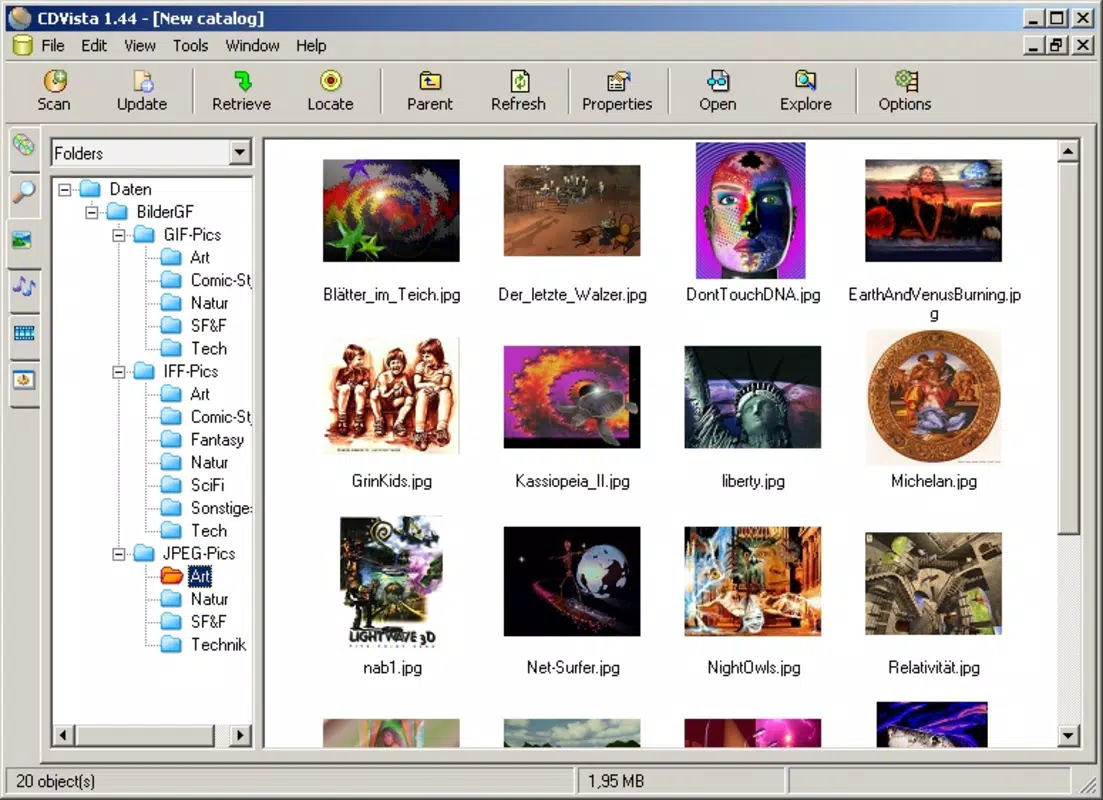
CDVista is a free mobile application designed to create a comprehensive catalog of your photos in miniature form. The app specializes in organizing digital image collections stored on physical media such as CDs, DVDs, or local folders. By scanning these sources, CDVista generates visual thumbnails of each photo, enabling users to browse and locate specific images quickly. This functionality is particularly valuable for individuals with large photo libraries that have been stored across multiple discs or folders over time.
CDVista addresses the common challenge of inefficient photo retrieval, where users spend excessive time searching through nested directories or physically handling discs. With the app, users can bypass this hassle by accessing a centralized visual index. The target audience includes hobbyists, families preserving memories, and anyone managing a growing collection of digital photographs. The app’s focus on simplicity and visual navigation makes it accessible to users regardless of technical proficiency.
Although the developer did not provide additional background details, the app’s long-standing presence in the market since its release on July 19, 2012, suggests a stable and enduring utility. CDVista fills a niche in the productivity category by offering a dedicated solution for photo indexing and digital archive management. Its ability to record drive information alongside thumbnails enhances the reliability of future searches, reinforcing its role as a tool for long-term memory preservation.
Key Features & Functionality
- Simple Photo Cataloging: Users can initiate the cataloging process by inserting a CD or selecting a folder containing images. The app automatically scans the selected source and generates miniature thumbnails for each photo, creating a visual summary of the collection.
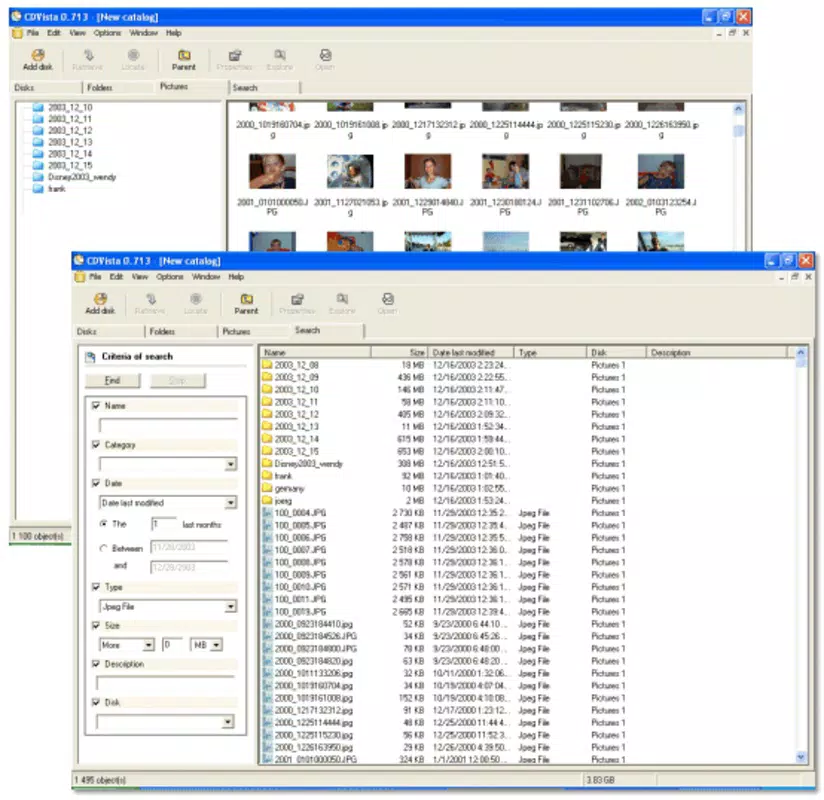
- Quick Photo Location: Instead of navigating through multiple folders or discs, users can search for a specific photo by browsing its thumbnail. This visual search method significantly reduces the time required to locate a desired image.
- Drive Information Storage: CDVista records metadata such as the drive name, path, and storage location for each photo. This feature ensures that users can trace the original source of any image, which is especially useful when managing photos across multiple devices or storage media.
- Time-Saving Solution: By centralizing image references in a searchable, visual format, CDVista streamlines the photo discovery process. This efficiency benefits users with extensive photo libraries who frequently need to retrieve specific images.
- User-Friendly Interface: The app features an intuitive layout designed for ease of use. Navigation is straightforward, allowing users to view, search, and manage their catalog without requiring technical expertise.
For example, a family with decades of vacation photos stored on old CDs can use CDVista to create a single visual index. When searching for a photo from a 2005 trip, they can quickly identify the correct disc and folder without manually opening each one. Similarly, a photographer managing multiple project folders can use the app to maintain a consistent, searchable archive.
Interface, UX & Performance
CDVista presents a clean and minimal interface, focusing on visual content rather than cluttered menus. The layout prioritizes thumbnail display, allowing users to scroll through a grid of miniature images with ease. Navigation is designed around intuitive gestures, such as tapping a thumbnail to view details or using a search bar to filter results.
The app’s visual style emphasizes clarity and readability, with consistent spacing and high-contrast thumbnails. Although the developer did not list formal performance metrics, the lightweight nature of the app—only 2.3 MB in size—suggests efficient resource usage. This makes it suitable for a wide range of Android devices, including older models with limited processing power.
Responsiveness appears to be optimized for basic interactions, such as loading thumbnails and navigating folders. Stability is implied by the app’s long-term availability, though no specific crash reports or update frequency were provided. Users can expect smooth operation during cataloging and browsing tasks, with minimal lag when handling moderate-sized collections.
Platform Compatibility & Technical Requirements
CDVista is available on the Android platform and requires no special hardware beyond standard storage access. The app has a file size of 2.3 MB, indicating a lightweight footprint that minimizes storage impact. It is compatible with Android devices that support basic file system access and image rendering.
The developer did not specify minimum OS requirements or version compatibility. As such, users should ensure their device meets general Android standards for running utility applications. The app’s release date of July 19, 2012, suggests it may not support the latest Android features, but its continued availability indicates ongoing functionality on supported devices.
Pros and Cons
Pros
- Free to download and use, making it accessible for all users.
- Lightweight design (2.3 MB) ensures compatibility with older Android devices.
- Visual thumbnail indexing simplifies photo retrieval from CDs or folders.
- Records drive and folder information for accurate photo tracking.
- Intuitive interface suitable for non-technical users.
Cons
- Developer did not provide detailed technical specifications or compatibility requirements.
- No information on update frequency or future development plans.
- May not support newer Android features or file formats beyond basic image types.
- Interface design appears dated, potentially less appealing to modern users.
- Limited functionality beyond photo cataloging and basic indexing.
FAQ
Is CDVista safe to install on Android?
Yes, CDVista is a free application that has been available since 2012. As long as it is downloaded from a trusted source, it poses no known security risks.
Can I use CDVista to scan photos from a USB drive?
Yes, the app supports scanning images from folders, which includes files stored on USB drives connected to your Android device.
Does CDVista work with DVDs and CDs?
Yes, the app can scan images stored on CDs and DVDs by accessing the file system through your device’s media reader.
How often should I update CDVista?
The developer has not disclosed an update schedule. Users should check the app store for updates periodically to ensure compatibility.
Is CDVista available for iOS?
Based on current information, CDVista is only available for Android. There is no official iOS version listed.
Final Thoughts
CDVista stands out as a niche yet effective tool for individuals managing large photo collections stored on physical media. Its ability to generate visual thumbnails and track file locations offers a practical solution to the common problem of digital clutter. While the interface may appear dated and the app lacks modern features, its core functionality remains relevant for users seeking a simple, free way to organize their memories.
Those who value digital memory preservation and efficient file organization will find significant value in CDVista. It’s particularly useful for families, archivists, or anyone with a legacy collection of photos on CDs or DVDs. The app’s minimal resource usage and zero cost make it an ideal choice for low-end devices.
Download CDVista now to transform your scattered photo library into a searchable, visual catalog—preserving your memories with ease and clarity.


